VdhCoApp and go2rtc are both connected to media handling, but they are designed for very different technical purposes. VdhCoApp was developed as a native companion application for Video DownloadHelper, while go2rtc is a media-streaming application designed to connect, convert, and redistribute real-time video and audio streams.
Because their architectures and intended workloads differ, they should not be viewed as direct substitutes. This comparison examines VdhCoApp and go2rtc objectively, covering their features, performance, compatibility, requirements, use cases, advantages, and limitations.
VdhCoApp Overview
VdhCoApp, also known as DownloadHelper CoApp, was created to provide native functionality for the Video DownloadHelper browser extension.
A browser extension can face restrictions when interacting directly with the local operating system. VdhCoApp provided a native layer that could handle tasks such as writing files, managing temporary files, launching external media applications, and supporting video conversion.
Its primary purpose was therefore to complement a browser-based downloading workflow rather than operate as a complete media-streaming server.
Key Features of VdhCoApp
- Native companion for Video DownloadHelper
- Browser-extension integration
- Native messaging communication
- Local file-writing support
- Temporary file handling
- External application launching
- Video conversion functionality
- FFmpeg-related support
- Desktop operating-system integration
VdhCoApp is associated with an older Video DownloadHelper architecture, so its historical functionality and present-day relevance should be considered separately.
go2rtc Overview
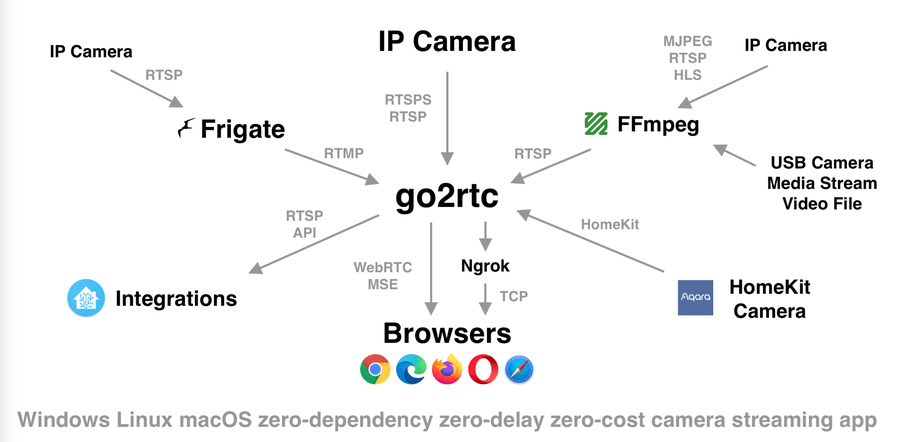
go2rtc is an open-source media-streaming application designed primarily for real-time video and audio sources.
It can connect to different types of media sources and expose streams through various protocols. The project is particularly relevant to IP cameras, surveillance systems, home automation, and applications that need to bridge different streaming protocols.
Rather than downloading media files for offline storage, go2rtc focuses on real-time media transport, protocol conversion, and stream distribution.
Key Features of go2rtc
- Real-time video and audio streaming
- Support for multiple streaming protocols
- Stream proxying
- Protocol conversion
- Camera integration
- WebRTC support
- RTSP-related workflows
- Low-latency streaming capabilities
- API-based configuration and management
- Designed for integration with other media and automation systems
The exact protocols and capabilities depend on the version and configuration.
VdhCoApp vs go2rtc: Core Differences
| Feature | VdhCoApp | go2rtc |
| Primary purpose | Native companion for Video DownloadHelper | Real-time media streaming and protocol bridging |
| Application type | Native desktop companion | Media server/streaming application |
| Main focus | Local media downloading and processing support | Live video and audio transport |
| Browser integration | Core part of its original design | WebRTC and browser streaming support |
| File downloading | Supports the associated downloading workflow | Not its primary purpose |
| Live streaming | Not its primary purpose | Core functionality |
| Protocol conversion | Limited to media-processing workflow | Major feature |
| Camera support | Not its primary purpose | Common use case |
| WebRTC | Not its primary purpose | Supported |
| RTSP | Not its primary purpose | Commonly used |
| Local file handling | Yes | Possible depending on workflow |
| Architecture | Browser extension + native companion | Standalone media-streaming service |
Features and Functionality
VdhCoApp Functionality
VdhCoApp operated mainly as a supporting native application.
Its functionality included:
- Saving media files locally
- Handling temporary files
- Opening media through desktop applications
- Supporting media conversion
- Communicating with Video DownloadHelper
- Providing native operating-system access
The browser extension remained the primary user-facing component.
go2rtc Functionality
go2rtc is designed around continuous media streams rather than traditional file downloads.
Its functionality can include:
- Connecting to IP cameras
- Receiving RTSP streams
- Relaying live video
- Providing WebRTC streams
- Converting between supported streaming protocols
- Serving media to compatible clients
- Managing multiple streams
- Integrating with home-automation platforms
- Providing low-latency access to compatible camera feeds
This makes go2rtc more closely related to a lightweight media gateway or streaming server than a downloader.
Performance Comparison
Performance should be evaluated differently for these two applications because they perform different workloads.
VdhCoApp’s workload can involve browser communication, local file operations, and media conversion. Its performance may depend on storage speed, CPU performance, browser activity, network bandwidth, and the characteristics of the media being processed.
go2rtc is designed for real-time media transport, where latency, CPU usage, network throughput, stream stability, and protocol overhead are important factors.
Performance can depend on:
- Number of active streams
- Video resolution
- Video bitrate
- Codec
- Network bandwidth
- CPU architecture
- Hardware acceleration
- Protocol being used
- Number of connected clients
A direct benchmark between VdhCoApp and go2rtc would therefore not be meaningful because their performance objectives are fundamentally different.
Compatibility
VdhCoApp Compatibility
VdhCoApp was designed for desktop operating systems and compatible browsers running Video DownloadHelper.
Its compatibility depended on:
- Operating system
- Browser
- Video DownloadHelper version
- Native messaging configuration
- VdhCoApp version
Its original design is closely associated with an older browser-extension workflow.
go2rtc Compatibility
go2rtc is designed to run on a variety of systems and architectures, including environments commonly used for servers, home automation, and embedded devices.
Its practical compatibility depends on:
- Operating system
- CPU architecture
- Source camera or media system
- Supported streaming protocols
- Client software
- Network configuration
Because go2rtc operates as a streaming service, network and protocol compatibility are particularly important.
Requirements
VdhCoApp Requirements
A historical VdhCoApp setup generally required:
- Compatible desktop operating system
- Supported web browser
- Video DownloadHelper
- VdhCoApp installation
- Native messaging configuration
- Internet access
- Local storage
The exact requirements varied according to the software versions involved.
go2rtc Requirements
A go2rtc deployment generally requires:
- A compatible operating system or supported hardware platform
- go2rtc application
- Network connectivity
- A compatible media source
- Appropriate stream configuration
- Sufficient CPU, memory, and network resources
For camera deployments, the source device must also expose a supported streaming protocol.
Use Cases
Common VdhCoApp Use Cases
VdhCoApp was primarily used for:
- Supporting Video DownloadHelper
- Saving browser-detected media
- Providing native file-system access
- Handling temporary downloaded files
- Opening media with desktop applications
- Supporting video conversion
It was designed around browser-based media downloading.
Common go2rtc Use Cases
go2rtc can be used for:
- IP camera streaming
- Home surveillance systems
- Home automation
- WebRTC camera access
- RTSP stream distribution
- Low-latency live video
- Protocol bridging
- Connecting cameras to media applications
- Relaying streams to multiple clients
It is particularly relevant when a media source and client use different streaming technologies.
Advantages of VdhCoApp
- Designed specifically for Video DownloadHelper
- Provides native operating-system functionality
- Supports local file operations
- Can assist with media conversion
- Uses native messaging for browser communication
- Fits a browser-based media workflow
- Provides capabilities that cannot always be implemented entirely within an extension
Limitations of VdhCoApp
- Not designed as a live-streaming server
- Not intended for camera-stream management
- Closely tied to Video DownloadHelper
- Requires native software installation
- Browser compatibility can affect functionality
- Its architecture is associated with an older Video DownloadHelper workflow
- Not designed for protocol bridging or low-latency stream distribution
Advantages of go2rtc
- Designed for real-time media streaming
- Supports multiple streaming protocols
- Useful for camera and surveillance systems
- Can bridge different media protocols
- Supports WebRTC-oriented workflows
- Can provide low-latency streaming
- Suitable for home-automation integrations
- Can run on relatively lightweight systems depending on the workload
Limitations of go2rtc
- Not designed primarily as a video downloader
- Requires streaming and network configuration
- Setup can be more technical than a conventional desktop downloader
- Performance depends on stream resolution, bitrate, and number of clients
- Protocol and camera compatibility must be considered
- Advanced deployments may require networking knowledge
Streaming vs Downloading
The most important distinction between VdhCoApp and go2rtc is the difference between downloading media and streaming media.
VdhCoApp was created to support the process of obtaining online media through Video DownloadHelper and saving or processing that media locally.
go2rtc focuses on keeping media streams available in real time. Instead of primarily creating a local video file, it receives a live stream and makes that stream available through compatible protocols and clients.
This difference affects virtually every aspect of the two applications, including architecture, resource usage, configuration, and use cases.
Camera Support
Camera integration is a significant area where go2rtc differs from VdhCoApp.
go2rtc can act as an intermediary between IP cameras and other applications. For example, an RTSP camera stream can potentially be made available to clients using another supported protocol.
VdhCoApp has no comparable camera-streaming role. Its purpose was associated with browser-based media downloading and local file operations rather than continuous camera feeds.
Browser Integration
VdhCoApp was built specifically around browser-extension integration. Video DownloadHelper could communicate with the native companion to perform operations requiring local system access.
go2rtc has a different relationship with browsers. It can provide streams through browser-compatible technologies such as WebRTC, allowing supported clients to view live media through a browser.
Thus, VdhCoApp uses the browser primarily as part of a media discovery and downloading workflow, while go2rtc can use browser-compatible streaming technologies for live media playback.
Resource Usage
Resource usage also differs according to the workload.
VdhCoApp typically performs short-lived tasks such as file operations or media conversion. Resource usage can increase substantially during video conversion, depending on resolution and encoding requirements.
go2rtc may operate continuously as a background service. Its resource consumption depends on the number of streams, codecs, resolutions, bitrates, connected clients, and whether streams need to be converted or relayed.
For a multi-camera system, network bandwidth can become as important as CPU and memory usage.
Maintenance and Compatibility Considerations
Maintenance is important for both projects, but their dependencies are different.
VdhCoApp’s relevance is connected to the Video DownloadHelper ecosystem and its browser integration architecture. Changes to browsers and the extension can affect how the companion application is used.
go2rtc’s compatibility depends heavily on streaming protocols, camera firmware, client applications, and network environments. Changes in any of these components can affect a deployment.
For either application, software versions and compatibility should be evaluated before building a production workflow.
Privacy and Security Considerations
The two applications also have different security considerations.
VdhCoApp provides native local-system functionality, meaning it can perform operations involving local files and applications as part of its intended workflow.
go2rtc can expose live camera or media streams across a network. This makes authentication, network access, firewall configuration, and stream exposure important considerations in deployments involving private cameras or internal networks.
Streaming services should be configured so that sensitive media is not unintentionally exposed to unauthorized users.
VdhCoApp vs go2rtc for Different Workflows
VdhCoApp Workflow
- Use Video DownloadHelper in a compatible browser.
- Detect available online media.
- Communicate with the native companion.
- Save media to local storage.
- Convert or open the media when required.
go2rtc Workflow
- Connect go2rtc to a supported media source.
- Configure the required stream.
- Select a compatible output protocol.
- Connect a supported client.
- Relay or view the live stream.
- Manage additional streams or clients as required.
These workflows demonstrate that the applications are designed around very different media tasks.
VdhCoApp vs go2rtc: Typical User Profiles
VdhCoApp is primarily associated with:
- Video DownloadHelper users
- Browser-based media workflows
- Desktop users saving online media
- Users requiring native file operations
- Developers working with browser native messaging
go2rtc is primarily associated with:
- Home-automation users
- IP-camera users
- Surveillance-system administrators
- Media-server users
- Developers working with streaming protocols
- Users requiring low-latency camera access
Final Comparison
VdhCoApp and go2rtc both interact with digital media, but they solve fundamentally different problems. VdhCoApp was created as a native companion for Video DownloadHelper, supporting local file operations, browser communication, and media-processing tasks. go2rtc is designed as a real-time media gateway that can receive, relay, and expose video and audio streams through supported protocols.
The major differences involve downloading versus streaming, browser-extension integration versus media-server architecture, local file processing versus real-time transport, and conventional media workflows versus camera and home-automation use cases.