Hypnotix and go2rtc are both open-source projects related to video streaming, but they serve very different technical purposes. Hypnotix is a desktop IPTV application designed for watching live television and other IPTV content, while go2rtc is a streaming gateway designed to connect, convert, and redistribute real-time media streams between different protocols and clients.
Hypnotix vs go2rtc Overview
Hypnotix is an IPTV application primarily associated with Linux desktop environments. It provides a graphical interface for browsing and playing television channels and other content supplied through configured IPTV sources.
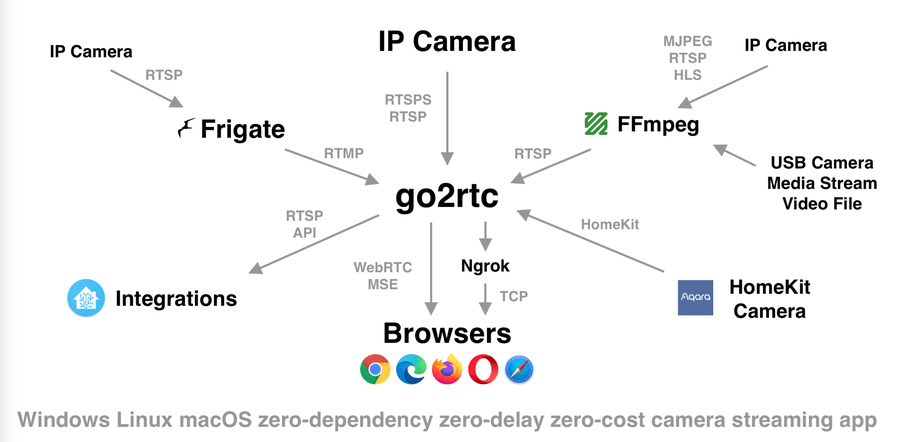
go2rtc is a lightweight media-streaming application designed to connect cameras and other real-time sources with clients using different streaming protocols. It is commonly used in self-hosted video and surveillance environments.
| Feature | Hypnotix | go2rtc |
| Primary purpose | IPTV viewing | Real-time media streaming and protocol conversion |
| Software category | IPTV player | Streaming gateway/server |
| Main environment | Linux desktop | Cross-platform/self-hosted environments |
| Graphical interface | Yes | Primarily configuration/API oriented |
| IPTV playback | Yes | Possible through supported streams, but not its primary purpose |
| Camera streaming | Not a core feature | Strong focus |
| Protocol conversion | Limited/not primary | Core capability |
| WebRTC | Not a core feature | Supported |
| RTSP | Can consume compatible streams | Strong support |
| HLS | Playback dependent on source | Supported as a streaming output |
| Stream redistribution | No | Yes |
| Typical users | IPTV viewers | Developers, homelab users, and surveillance setups |
Features Comparison
Hypnotix Features
Hypnotix focuses on providing a user-friendly IPTV viewing experience. Depending on the configured source, it can provide:
- Live television playback
- IPTV channel organization
- Electronic Program Guide (EPG)
- Video-on-demand content
- TV-series content
- Provider-based configuration
- Desktop media playback
The channels and other content available through Hypnotix depend on the IPTV provider or authorized source being used.
go2rtc Features
go2rtc is designed as an infrastructure component rather than a conventional media player. Its capabilities include:
- Real-time stream handling
- RTSP support
- WebRTC support
- HLS support
- Stream restreaming
- Protocol conversion
- Multiple input and output formats
- Low-latency streaming workflows
- Camera and surveillance integrations
- API-based stream management
- Integration with self-hosted applications
It can act as an intermediary between a media source and one or more viewing clients.
Performance
The performance profiles of the two applications are significantly different.
Hypnotix primarily decodes and displays IPTV streams. Its playback performance depends on the Linux system, video codec, stream resolution, network connection, and IPTV server. It is intended to provide direct viewing rather than operate as a media infrastructure service.
go2rtc is designed to move and transform real-time streams efficiently. One of its important characteristics is the ability to avoid unnecessary transcoding when a compatible stream can be passed through directly. This can reduce CPU usage compared with workflows that require complete video transcoding.
Performance in a go2rtc deployment can still depend on:
- Number of simultaneous streams
- Input and output protocols
- Whether transcoding is required
- Video resolution and bitrate
- Network bandwidth
- Available CPU and memory
- Connected cameras or media sources
Thus, Hypnotix primarily measures performance through playback smoothness, while go2rtc is more concerned with efficient stream handling and delivery.
Compatibility
Hypnotix Compatibility
Hypnotix is primarily intended for Linux desktop systems. Compatibility can depend on:
- Linux distribution
- Distribution version
- Hardware architecture
- Multimedia libraries
- IPTV playlist/provider
- Stream protocol
- Video and audio codecs
The IPTV source must provide streams compatible with the application’s playback environment.
go2rtc Compatibility
go2rtc is designed to work across different operating environments and can be integrated into self-hosted systems.
Its compatibility is influenced by:
- Operating system
- Supported input protocol
- Supported output protocol
- Camera or media-source capabilities
- Client compatibility
- Network configuration
- Hardware resources
Its protocol-oriented architecture allows it to connect sources and clients that might otherwise use incompatible streaming technologies.
Requirements
Hypnotix Requirements
A typical Hypnotix setup requires:
- Compatible Linux desktop system
- Internet or local network connection
- Authorized IPTV provider or playlist
- Supported media playback environment
- Sufficient hardware for the desired video quality
The exact requirements depend on the Linux distribution and the type of IPTV stream being played.
go2rtc Requirements
go2rtc generally requires:
- Compatible operating system or self-hosted environment
- Media source such as a camera or stream
- Network connectivity
- Appropriate stream configuration
- Sufficient CPU and memory for the workload
Basic stream relaying can be relatively lightweight, while more demanding conversions or multiple concurrent streams can require additional resources.
Protocol and Streaming Architecture
This is one of the most important differences between Hypnotix and go2rtc.
Hypnotix is primarily a consumer application. It receives media from an IPTV source and presents that media to the user.
go2rtc is primarily a streaming intermediary. It can accept a stream from one source and expose it through another protocol to a compatible client.
For example, a camera may provide an RTSP stream while a browser-based application requires WebRTC. A streaming gateway such as go2rtc can help bridge that difference.
This makes go2rtc more relevant to media infrastructure and integration than conventional IPTV viewing.
User Interface
Hypnotix provides a graphical interface intended for everyday television viewing. Users can browse channels and select content without needing to manage a streaming server.
go2rtc follows a more technical workflow. Configuration files, APIs, stream URLs, and integrations are more important than a traditional channel-browsing interface.
As a result, the applications target very different user experiences.
Use Cases
Hypnotix Use Cases
Hypnotix can be used for:
- Watching IPTV channels on Linux
- Browsing live television
- Viewing EPG information
- Streaming authorized IPTV content
- Accessing provider-supported VOD content
- Creating a desktop IPTV viewing setup
go2rtc Use Cases
go2rtc can be used for:
- Connecting IP cameras to different clients
- Restreaming RTSP sources
- Providing WebRTC streams
- Converting between supported streaming protocols
- Reducing latency in camera-viewing workflows
- Integrating cameras with self-hosted applications
- Building custom video-streaming systems
- Connecting media sources to browsers and other clients
Pros and Limitations
Hypnotix Pros
- Open-source IPTV application
- Straightforward television-focused interface
- Designed for Linux desktop environments
- Supports live IPTV playback
- Can display EPG information when provided
- Supports additional IPTV content depending on the source
Hypnotix Limitations
- Primarily Linux-focused
- Requires an appropriate IPTV source
- Playback quality depends on external streams
- Not designed as a streaming server
- Limited relevance for camera-stream infrastructure
- Does not provide go2rtc-style protocol bridging
go2rtc Pros
- Open-source streaming gateway
- Designed for real-time media
- Supports multiple streaming protocols
- Useful for camera and surveillance systems
- Can restream media to multiple clients
- Suitable for low-latency streaming workflows
- Can integrate with self-hosted applications
- Can avoid transcoding when direct stream compatibility is possible
go2rtc Limitations
- More technically oriented than a conventional media player
- Requires configuration and knowledge of streaming protocols
- Not designed primarily for watching IPTV channels
- Performance requirements increase with complex stream processing
- Compatibility depends on the source and target protocols
- Users may need additional software for a complete viewing or surveillance solution
Hypnotix vs go2rtc: Key Differences
- Purpose: Hypnotix is an IPTV player, while go2rtc is a real-time streaming gateway.
- Role: Hypnotix consumes streams for viewing; go2rtc connects, converts, and redistributes streams.
- Interface: Hypnotix offers a graphical television interface, whereas go2rtc is primarily infrastructure-oriented.
- Protocols: go2rtc places much greater emphasis on protocols such as RTSP and WebRTC.
- Cameras: Camera streaming is a major go2rtc use case but not a core Hypnotix function.
- Platform: Hypnotix is strongly associated with Linux desktops, while go2rtc is designed for broader self-hosted deployment scenarios.
- Performance: Hypnotix focuses on playback, while go2rtc focuses on efficient stream transport and protocol handling.
- Technical requirements: Hypnotix is oriented toward viewers; go2rtc generally requires greater knowledge of networking and streaming configuration.
Conclusion
Hypnotix and go2rtc address different parts of the streaming ecosystem. Hypnotix is a Linux-focused IPTV viewing application designed to help users watch live television and other IPTV content. go2rtc is a real-time media streaming gateway designed to connect sources such as cameras with clients through protocols including RTSP and WebRTC.
The main differences are found in their purpose, architecture, interface, protocol support, and deployment model. Hypnotix operates primarily as a media consumer, while go2rtc functions as streaming infrastructure. Neither directly replaces the other, and their respective strengths are tied to the type of video workflow being implemented.